
OTP password reset
FairPlay Login Password — Quick Reset With a 6-Digit OTP Inside 10 Minutes
Three wrong guesses on the FairPlay sign-in card? Stop guessing and switch to the reset card. Your phone gets a 6-digit code that stays usable for 10 minutes, the replacement can run anywhere from 8 to 16 characters, and balance plus User ID stay exactly as they were.
Why a FairPlay Login Password Stops Working — Clear Causes First
A message the FairPlay desk sees most weekends goes roughly like this. Someone swaps phones on Friday. The new browser has no saved password, and by Saturday evening he has made three guesses on the sign-in card, all wrong. Nothing had happened to his ID at all. He had simply never typed that password by hand since the the day it was set, so his fingers had no memory of it. The reset took him about ten minutes (most of that went on finding where the new phone keeps its text messages).
That is the usual case, and the FairPlay reset card exists for it. Other causes look the same from the outside. Caps lock left on. A keyboard that capitalises the first letter without asking. A browser that fills in a password saved for some other account.
And quite often the password was right all along and the picture code was what failed. The FairPlay sign-in card asks for both, so a wrong code feels exactly like a wrong password; the rules for that code sit on the FairPlay login page. Before you reset, one slow retype with the picture code read carefully is probably worth the twenty seconds. Still refused? Then reset.
One case a reset cannot touch: a forgotten User ID. The first box on the reset card wants the ID, so without it you stop at step one. A changed mobile number blocks it too, because the code has nowhere to land. Both of those go to the WhatsApp desk, whose number is on the FairPlay login number and desk page.
A rough way to decide, then. If you are sure of the password and only the picture code keeps failing, do not reset; retype the code. If you are not sure of the password, or the browser has been filling it in for months and you have never actually seen it, reset now rather than burning more guesses. A FairPlay reset costs you a few minutes and a text message. Guessing costs you the evening, more or less.
The reset card uses a handful of terms. Here is what each one means on FairPlay, in practice rather than in theory:
- Reset card
- Where FairPlay swaps an old password for a new one. Three short screens, one phone, and no desk involved unless the mobile has changed.
- Registered mobile
- The single destination for a FairPlay OTP: the number on file for your ID. Same number moved onto a new SIM? No problem. A new number altogether? The code still heads to the old one, which is why that case belongs to the desk.
- 6-digit OTP
- A one-time code of six numbers. Typing it proves the person resetting is holding the phone tied to the ID.
- 10-minute window
- How long each code lives, counted from the moment it is sent rather than the moment you open the message.
- New password
- Anything from 8 to 16 characters. Seven is too short, seventeen is too long, and both get turned back on the last screen.
- Picture code
- Not part of the reset at all. It belongs to the everyday sign-in card, which is where you will meet it again after the new password is saved.
Easy FairPlay Login Password Reset in Five Steps
Have the phone with the registered number in your hand before you begin. That one thing decides how the next ten minutes go. The rest of the FairPlay reset is typing.
- Open the reset card. Phone with the registered SIM beside you, three failed guesses behind you: that is the moment. From the FairPlay sign-in card the forgotten-password option is the way in, and from this page the button at the top gets you there through the official lobby.
- Type your User ID and the registered mobile. Both have to match what FairPlay holds for that ID. Enter the ID exactly as it was issued to you, with no space before or after it, and the mobile as ten digits.
- Switch to messages, leave the card open. Six digits come to the registered phone, and the FairPlay count of 10 minutes is already running by the time you see them. Read them, then jump back.
- Enter the code inside 10 minutes. Six digits, no gaps. If you copy it out of the message, check nothing extra came along with it.
- Pick the new password, 8 to 16 characters, and prove it. One immediate sign-in on the everyday FairPlay card, picture code included, tells you the save went through.
Step five gets skipped more than any other, and it is the one that catches mistakes. If the new password was mistyped while you were racing the clock, you find out now, while the reset is fresh in your head, rather than on Sunday afternoon with a match already running.
The app is the next place to visit. It runs on the same FairPlay ID, so the password you just made is the one it expects; on a fresh handset, install it first from the FairPlay app download page and then sign in.
Timing helps as well. A FairPlay reset started during the last few overs of a chase is a reset done badly: you will be glancing at the score, the code will sit unread, and the window will close on you. Do it before the toss, or at a break, when ten quiet minutes are easy to find. It sounds fussy. In practice it is the difference between one code and three.
Two people sharing one FairPlay ID is where resets go wrong. The OTP lands on whichever phone is registered, so if a friend's number sits on your ID, every password reset depends on him picking up.
A Real FairPlay Reset, Minute by Minute, Against the OTP Clock
Take one reset, traced the way it tends to play out. The person is a composite of a few desk conversations and the clock times are illustrative. The rules are FairPlay's own: six digits, ten minutes, 8 to 16 characters.
9:02 pm. Rohit (call him that) gives up after his third guess and opens the FairPlay reset card. He types his User ID from memory, since that part he does know, and the mobile number he signed up with.
9:03 pm. The code is sent. That timestamp matters more than anything else in the story, because the 10-minute window runs from here and closes at 9:13 pm.
9:04 pm. A phone call. Five minutes about something else entirely.
9:09 pm. Back on the card with four minutes left, which is less time then he thinks. He reads the six digits off the message and types them, but swaps the third and fourth. The card refuses it and he is still sitting on the code box.
9:10 pm. Second try, one digit at a time. Accepted.
9:11 pm. New password. His first idea is a phrase of eighteen characters, which is two over the FairPlay limit of 16, so he cuts a word and lands on fourteen.
9:12 pm. He signs in on the normal FairPlay card with the new password and the picture code. Balance where he left it.
Ten minutes start to finish, with one minute of slack. Had the call run three minutes longer, the code would have died at 9:13 and he would have needed a fresh one. Not a disaster. Just another round from the top, and another code to wait for.
What made it work was luck, mostly. Well, partly luck: he also knew which number was on his FairPlay ID, and that is the part people get wrong far more often than the typing. If you have more than one SIM, work out which one the ID was opened with before you press send, because the clock does not care that you are checking.
Look at the gaps between his entries rather than the entries themselves. Typing took about a minute in total. The other nine went on a call, a misread digit and a password that was too long. That split is typical of FairPlay resets in general: the form is short, and the time goes on everything around it.
The table below is the same session turned into a countdown you can use on your own reset. Read across a row for what the code is doing at that minute and what you should be doing.
| Clock since code sent | Code status | Your move |
|---|---|---|
| 0 min | Sent to the registered mobile, 10 minutes left | Open the messages on that phone and leave the reset card open |
| 1-4 min | Live, plenty of time | Type the six digits and read them back once before submitting |
| 5-8 min | Live, half the window gone | Drop whatever else you are doing and finish the code box |
| 9 min | Live, final minute | Enter it now, even if you are unsure of one digit |
| 10 min | Expired | Go back to the reset card and request a new 6-digit OTP |
| New request | A fresh 10 minutes begins | Use only the newest code in your inbox, ignore older ones |
Now the version where it goes wrong, because that one is just as common. Priya requests her FairPlay code at 3:40 in the afternoon, sees the message arrive, and decides to finish after she has made tea. She comes back at 3:52. Twelve minutes. The code is two minutes past its life and the card will not take it, however carefully she types.
So she starts over. New request at 3:53, a fresh six digits a moment later, code entered at 3:55 and a new password of eleven characters saved at 3:56. Three minutes the second time round. The lesson is dull but real: the FairPlay reset is quick when you stay with it and slow only when you leave it half done.
Notice where the new password fits: after the code, not before. Since FairPlay only asks for it once the OTP is accepted, the smart move is to decide on it before you even request the code. Thirty seconds of thinking at 9:02 would have saved Rohit his trimming at 9:11.
The FairPlay Reset Screen on a Phone — Safe Checks Before You Save
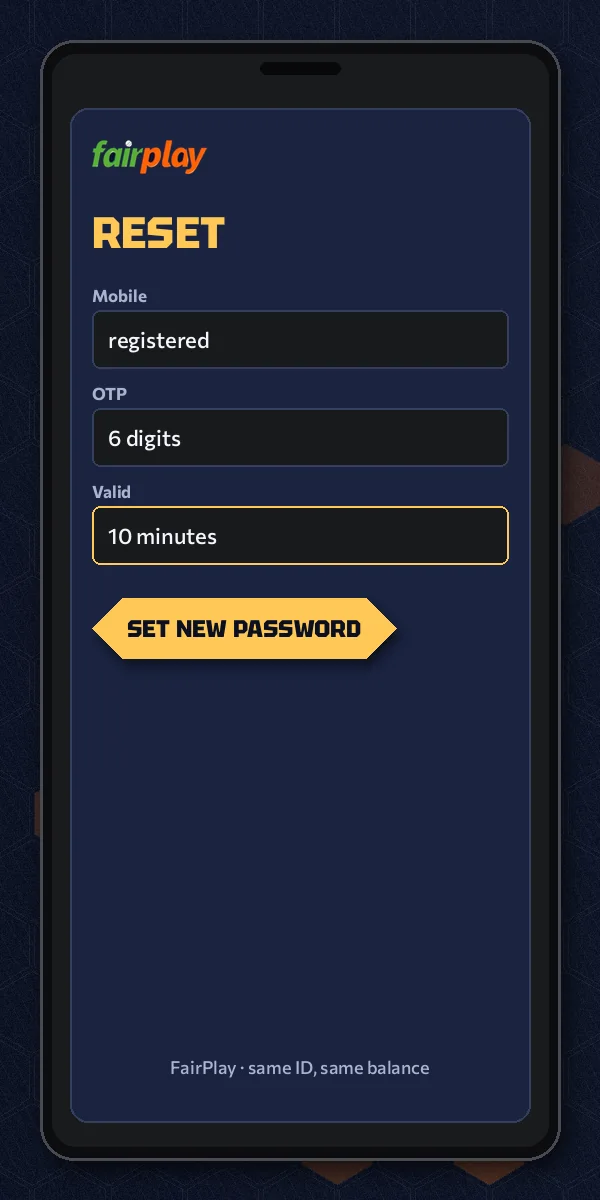
Picture the usual setup, one handset doing two jobs. The FairPlay reset card is open in the browser, the six digits sit in the messages app, and you hop between them with the clock running. Easy enough. It is also exactly where a minute or two disappears, and you only get ten.
On a small screen the reset reads as three stages. First the User ID and the registered mobile, then the box for the 6-digit OTP, and only after the code is accepted the field for the new password. That last field is the one people rush, so have the new FairPlay password ready in your head before the first screen.
Before you tap the final save on the new FairPlay login password, run through the four snags below. Each one has turned a two-minute job into a twenty-minute one for somebody.
The FairPlay code never shows up
Check the mobile you typed against the one on your FairPlay ID. One digit off and the code goes to a number you cannot see. Dual-SIM phone? The registered SIM has to be the active one. If ten minutes pass with nothing, the window is gone anyway, so start a new request rather than waiting on the old one.
The new password gets refused
Count the characters. FairPlay takes 8 to 16 and nothing outside that range, and its easy to land on 7 or 17 without noticing. Autofill sometimes adds a trailing space, too, which counts as a character.
The number on the ID has changed
Then the reset card has no way to reach you, and no amount of retrying will change that. The desk handles it; the route is on the FairPlay WhatsApp desk page.
Resetting from a laptop instead
This is actually the easier setup. The FairPlay reset card sits on the big screen, the code arrives on the phone beside it, and you read from one while typing into the other. No switching apps, no losing the card in the background. If a laptop is nearby when you realise the password has gone, use it.
Several code requests in a row
Pressed send twice because the first code felt slow? Then two messages may be sitting in your inbox. Go by the newest one. Typing the older code is the most common reason a correct-looking OTP gets turned down, and it eats into the very same ten minutes you are trying to save.
The reset worked, now what
Your FairPlay ID is the same ID, with the same balance. Only the password moved. If you came here because a withdrawal was waiting, the payout side lives on My FairPlay account page. And if it turns out you never had an ID in the first place (it happens), the FairPlay ID application is where to start.
Keep the six digits to yourself. Nobody needs your FairPlay OTP to help you with a reset, not a friend and not a caller who says he is support. Whoever has the code can finish the reset, and then the new password is his, not yours.
People also search
Trusted FairPlay Login Password Reset Facts
What the fairplay login password reset asks for, box by box
A fairplay login password reset on this lobby runs on three inputs and one rule about time. You type them into the same reset card on a phone or a laptop, in this order:
- Your FairPlay User ID, exactly as it was issued
- The registered mobile number on that ID
- The 6-digit OTP that reaches that mobile
How the OTP clock and the new password limit fit together
The code lives for 10 minutes and the new fairplay login password has to sit between 8 and 16 characters. Side by side:
| Reset item | FairPlay rule |
|---|---|
| OTP length | 6 digits |
| OTP life | 10 minutes from sending |
| Where it goes | Registered mobile only |
| New password | 8 to 16 characters |
| Code expired | Request a fresh one |
Where a saved fairplay login password works afterwards
Everywhere your FairPlay ID works: the sign-in card on any official address, the app, and the account pages. The old password is finished once the new one saves.
Two situations sit outside this table: a lost User ID and a retired mobile number. Neither can receive a FairPlay OTP, so the login number page carries the next step for both.
FairPlay Login Password Questions — Quick Genuine Answers
How do I reset my FairPlay login password?
Open the reset card from the FairPlay sign-in screen, type your User ID and registered mobile, and wait for the 6-digit OTP. Enter it within 10 minutes, choose a new password of 8 to 16 characters, then sign in once on the normal card to confirm the change worked.
Is the FairPlay password reset safe?
It is tied to your phone, which is what keeps it safe. The code goes only to the mobile registered on the FairPlay ID and dies after 10 minutes, so a stranger without that phone cannot finish the reset. Never read the six digits out to anyone, including callers claiming to be support.
What happens if I type the wrong FairPlay OTP?
The reset card refuses it and your password stays as it was. Check the six digits against the message, retype them slowly, and finish before the 10 minutes run out. If the code has already expired, request a fresh one and use only the newest code that reaches your registered mobile.
How long is the FairPlay reset code valid?
Ten minutes from the moment FairPlay sends it. The clock does not wait for you to open the message, so start a reset only when you can finish it. Once the window closes the code is dead; go back to the reset card and request another 6-digit OTP.
What is the minimum length for a new FairPlay password?
Eight characters is the minimum and sixteen the maximum. Anything shorter or longer is refused on the last screen of the reset, which hurts while the OTP clock is still running. Decide on the new FairPlay login password before you request the code, then type it once you are through.
Which FairPlay address should I use for a password reset?
Use any official FairPlay address that opens for you today. The password belongs to your ID, not to the address, so a reset done on one mirror also works on the others and in the app. The lobby buttons on this page take you to the current official entry.