
Four-entry registration
FairPlay Sign Up — Four Entries, One OTP and a Free ₹5,000 Demo Balance
Register on FairPlay by typing your name, a 10-digit mobile number, the one-time code that number receives, and the name your UPI app shows, then ticking the 18+ box. That is the whole form. A free ₹5,000 demo balance opens right after, before you deposit a rupee, so the first thing you do inside is practise rather than pay.

One box causes more trouble later than all the others together: Name on UPI. Type a nickname there, or "Sunny" when your bank says "Sunil Kumar Rao", and FairPlay sign up still goes through without complaint. That mismatch tends to surface weeks later, often on the day you ask for money back. Copy the name from your UPI app, letter for letter, and the problem never exists.
Mobile has it's own quiet trap. It wants ten digits, and it wants the number you actually carry, because that is where the FairPlay OTP goes. Your work SIM sitting in a drawer will receive the code just fine. You just will not be holding it.
Then there is the 18+ tick, which people scroll past. Leave it empty and the registration is not finished, however perfect the other four entries look. It takes half a second. Players still miss it.
Quick FairPlay Sign Up Routes for Phone, Desktop, App and Desk
Four entries, one OTP, one tick. None of that changes between devices. What does change is where the FairPlay form lives on your screen and how far the code has to travel to reach you, which in practice decides whether registration feels like thirty seconds of typing or a small hunt for the right phone.
| Route | Where you begin | Where the OTP lands | Watch out for |
|---|---|---|---|
| Phone browser | Register in the FairPlay9 header, then the official lobby in a new tab | Same phone | Switching apps to read the code and losing the tab |
| Desktop browser | Same Register card, wider form | The phone beside you | Typing the code from a screen you cannot see well |
| FairPlay app (Android) | The app's own register screen | Same phone | Installing first when the browser would have done |
| iPhone | Safari, then a home-screen icon if you want one | Same phone | Hunting the App Store for something that is not there |
| WhatsApp desk | A chat with the FairPlay desk | Your phone, while you chat | Sending details to any number other than the official one |
Phone browser: the route most FairPlay players take
On a phone, everything happens on one screen. Tap Register at the top of any FairPlay9 page and a small card slides in with Name and Mobile; its link carries you to the official FairPlay lobby, where the full form waits. Your OTP then arrives on the same handset. Here is where people stumble, oddly enough: they leave the browser to read the message, come back, and find the tab reloaded. Long-press the notification instead of opening it, if your phone allows that, and copy the digits without leaving the form.
Desktop: bigger form, two screens
Registering from a laptop is perfectly normal and arguably easier for the two name boxes, since you can see your full UPI name in another window while you type. Physically, though, the code still goes to your phone. Keep it face-up on the desk before you press the button that sends the OTP, not in a bag across the room.
FairPlay app and iPhone
If you already have the Android build, the register screen inside it asks for the same four things in the same order. There is no reason to install it just to sign up, though; the browser form creates the identical account. Size, Android version and the iPhone home-screen method all live on the FairPlay app download page, which is the right place to check them before you commit storage.
The WhatsApp desk route
Some people would rather type to to a person. That works too, with one condition: use only the number listed on the official FairPlay login number page, and expect the desk to ask for the same name, mobile and UPI name the web form asks for. Nothing extra. If anyone on a chat asks for your UPI PIN during FairPlay sign up, that chat is not the desk.
Easy FairPlay Register Steps, Shown Beside the Phone Screen
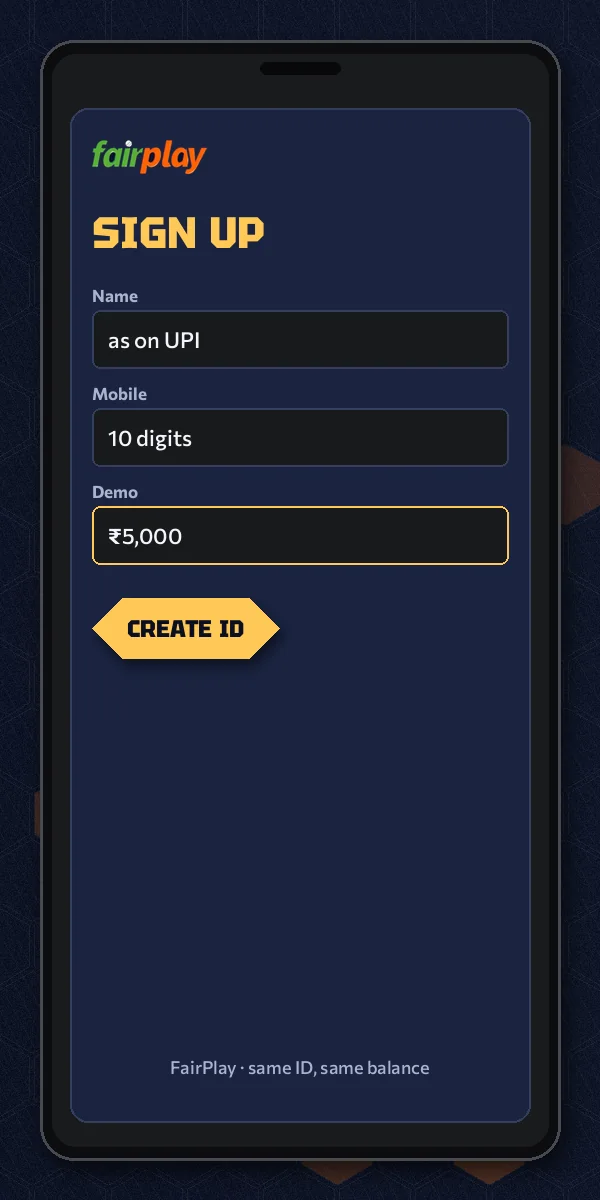
- Tap Register in the FairPlay9 header, or the card at the top of this page. Expect the official FairPlay lobby in a new tab.
- Name next. Spell it out completely, the way your passbook does, and skip initials unless the passbook uses them too.
- Enter the mobile: ten digits, the number WhatsApp runs on, on a phone that is in your hand right now.
- Request the OTP and type it in as soon as it lands. Do not close the tab to go looking for it.
- Fill Name on UPI by copying what your UPI app displays, spaces and all.
- Tick the 18+ box, submit, and the ₹5,000 demo balance appears with your new FairPlay User ID.
Six steps on paper, four real entries. Steps one and six are just a tap each. In the picture, the FairPlay screen shows the form after step five, which is roughly the point where most people slow down, because it is the first box that asks you to check something rather than remember it.
A small aside: the order matters more than it looks. Request the code before the mobile is right and you burn a request on the wrong number, then sit waiting for a message that went to somebody's cousin. Fix the ten digits first. Then ask for the code.
Picking up a FairPlay registration you left halfway
Closed the tab after the code arrived? It happens, mostly to people registering on a bus. An OTP is single-use, so the old one is worth nothing now; go back through the Register card and start the form again from the name. If the lobby never showed you a User ID, assume no account was made. If it did show one and you simply lost the screen, do not register a second time on the same mobile. Message the FairPlay desk with that number and ask which ID is attached to it. Two half-made accounts on one phone is a tidier problem to avoid than to untangle.
Once you are through, the FairPlay login page covers what the sign-in form asks for on your next visit, so this page does not repeat it. You will not need it immediately anyway; a fresh FairPlay registration drops you straight into the lobby with the practice balance already loaded.
Clear FairPlay Registration Terms, Read Field by Field
Every word on the FairPlay registration form, in the order you meet it, with what it actually wants from you. The exchange rules you agree to at the last tick sit on the FairPlay terms and conditions page; this section is only about the form.
- Name
- Your full legal name. FairPlay uses it to label the account, so a gaming handle belongs nowhere near this box.
- Mobile
- Ten digits. Whichever number receives the OTP and, later, the one the WhatsApp desk recognises you by.
- OTP
- A one-time code sent to that mobile. One per sign-up. If it expires before you type it, request another rather than guessing.
- Name on UPI
- Whatever name your UPI app shows on its home or profile screen. Not your nickname, not your spouse's account.
- 18+ tick
- A confirmation that you are an adult. Without it the FairPlay form is incomplete.
- Demo balance
- ₹5,000 of practice credit that appears after sign up and before any deposit. It is for learning screens, not for withdrawing.
- User ID
- FairPlay hands this to your new account as its handle. You type it, not your mobile, when you sign in later.
- Official lobby
- Where the Register card links: the exchange page itself. Start there, or from FairPlay9, and you avoid forwarded look-alike links.
Two of these deserve a second look. "Name" and "Name on UPI" sound like the same question asked twice, and plenty of players treat them that way, typing a short version in one and a long one in the other. They are separate on purpose. One identifies you to FairPlay; the other has to match an account at your bank. When the two match each other as well, nobody has to ask questions later.
What the FairPlay form leaves out is just as telling. No bank password. No card number, no CVV, no UPI PIN, no photo of anything. Four entries and a tick, that is the full list, and anything beyond it during sign up is a red flag about the page you are on rather than a new rule from FairPlay. Close it, return to FairPlay9, and start again from the header.
Then the demo balance. ₹5,000 sounds like money and behaves like money on screen. It is not. Think of it as a rehearsal wallet: you can open a cricket market, watch how a bet slip fills, try a few rounds of a casino game, and none of it touches your bank. Real stakes start with a first deposit, and the minimum for that sits with the rest of the account facts on the FairPlay ID page.
Spending the FairPlay demo pot on something useful
New players tend to burn the practice balance in ten minutes on one game and learn nothing. A better use: open one cricket match and look at how the back and lay columns sit side by side, place a small practice bet and find it again in your open bets, then try two or three Aviator rounds to feel how quickly a cash-out has to happen. Twenty minutes, maybe less. By the end you know where the FairPlay bet slip lives and what an open bet looks like in your history, which is exactly the knowledge you want before the first real rupee goes in. Practice is free; confusion on a live deposit is not.
A Real FairPlay Login ID Sign Up, Clocked Minute by Minute
What follows is a composite, several ordinary sign-ups stitched into one evening rather than one real player's diary. Our player is a 31-year-old accountant in Nagpur we will call Meera, on her phone, on home Wi-Fi, on a weeknight. Nothing about her registration is unusual, which is exactly why it is useful.
9:40 pm. Meera opens FairPlay9 in Chrome, taps Register in the header and reads the small card. One more tap reaches the official lobby. New tab, full form.
9:41 pm. Name: she types "Meera Deshpande". Mobile: ten digits, her own WhatsApp number. She asks for the OTP and, sensibly, does not leave the page; the notification banner shows the code and she types it straight in.
9:42 pm. Name on UPI. Here she pauses. Her UPI app says "MEERA S DESHPANDE" (her father's initial, from the bank account she opened at nineteen). Typing her name the short way again had been the plan. Instead she copies the long version instead, initial included.
9:43 pm. She ticks 18+, submits, and the lobby loads with ₹5,000 sitting in the demo wallet and a new FairPlay User ID at the top. Screenshot of the ID: good habit.
That is the clean run. Now the version where it goes slightly wrong, because it does, regularly. Meera's brother tries the same thing ten minutes later from the sofa. He types his mobile with one digit swapped, asks for the code, waits, waits a bit more, and nothing comes. Of course nothing comes; the OTP went to a stranger. He notices the typo on the third look, corrects it, requests a fresh code, and finishes about five minutes behind her. Anoying, not serious.
Hard to say what the most common FairPlay sign up failure is overall, but in this kind of household test the pattern is fairly clear. Wrong mobile beats wrong name, and wrong UPI name beats both for how much trouble it causes later, simply because nobody notices it on the night. Correction, actually: people notice it, they just decide it does not matter. It matters the first time money moves the other way.
If you are stuck mid-form, there are three moves, in this order. Check the ten digits. Request one fresh code, not five. Then, if the code still refuses to show, open a chat via the FairPlay WhatsApp login number and tell the desk which number you typed; which tells them where the code actually went. Then once you are in, the FairPlay Club page is worth a look before you deposit, since it explains what regular players get back over time.
Five FairPlay sign up snags and the fix for each
- No OTP after a minute or two: re-read the ten digits on screen before asking again. A swapped pair is the usual cause.
- Code typed, form says it is wrong: you probably used an older code. Only the most recent one counts, so request one and use that.
- Submit does nothing: scroll up. That 18+ tick is empty more often than people believe.
- UPI name will not fit or looks odd: copy it as your UPI app shows it, capitals and initials included, even if it looks clumsy.
- Mobile already in use: you, or someone in the house, registered with it before. Try the FairPlay login page first, and ask the desk if no User ID comes to mind.
None of these needs more than a couple of minutes, and none of them costs anything, because FairPlay registration itself is free and the demo pot is practice credit. Only one mistake on the whole form is expensive, and it is the UPI name left wrong for weeks. Fix that one tonight, while it is still just a typo in a box.
Four numbers, and every one of them belongs to registration itself. Anything beyond that — deposit size, payout speed, which games load first — belongs to the pages that own those details, and they are linked from here rather than copied.
People also search
Official FairPlay Register and Registration Notes for This Form
How each search phrase maps to this sign-up form
Typing fairplay sign up or fairplay register into a search bar
Both phrases end at the same form on this page. FairPlay sign up and FairPlay register are two names for one action: name, mobile, OTP, Name on UPI, the 18+ tick, and the ₹5,000 demo balance once you submit.
FairPlay registration as a noun usually comes from people who started the form earlier and want to finish or fix it. The answer is the same four entries; only a wrong mobile or UPI name needs going back to.
- Starting fresh on a phone: Register in the FairPlay9 header, then the official lobby.
- Starting on a laptop: same card, with your phone close for the OTP.
- Preferring a chat: the desk asks for the same three typed details.
The fairplay login id sign up question on this form
People searching fairplay login id sign up want to know where the ID comes from. It is created by registration itself and shown when the lobby opens, so there is no separate step to request one.
| Search phrase | What this page gives it |
|---|---|
| fairplay sign up | The four entries and the tick |
| fairplay register | Device routes and the OTP order |
| fairplay registration | Field terms and fixes for typos |
| fairplay login id sign up | Where the User ID appears |
Sign-in details for later visits belong to the FairPlay login page.
Quick FairPlay Sign Up Questions Asked Before the OTP

How do I sign up on FairPlay?
Open the Register card on FairPlay9 and follow its link to the official lobby, then type your name, a 10-digit mobile number, the OTP sent to that number and the name on your UPI. Tick the 18+ box and submit, and a free ₹5,000 demo balance opens straight away.
Is FairPlay registration safe to do on my phone?
Yes, provided you start from the FairPlay9 Register card rather than a forwarded link, because that card points to the official lobby. The form asks for four entries and an 18+ tick, and none of them is a bank password, a card number or a UPI PIN.
What if I typed the wrong name or mobile during FairPlay sign up?
A wrong mobile sends the OTP elsewhere, so correct the ten digits before you request a fresh code. A wrong Name on UPI is quieter but matters more later; message the FairPlay desk with your User ID and the correct name and ask for it to be fixed before your first deposit.
How long does FairPlay registration take?
Most of the time goes on waiting for the OTP, since the typing is four short entries and one tick. The FairPlay ID page carries the measured timing for a new account, but when the code arrives promptly it is a single short sitting that ends with the ₹5,000 demo balance.
Do I need to deposit money to register on FairPlay?
No deposit is needed at this stage. Registering on FairPlay is free, and the ₹5,000 demo balance shows up first so you can learn the screens with practice credit. Real-money play starts only with a first deposit, and the minimum for that is listed on the FairPlay ID page rather than here.