
Three fields, one lock
FairPlay Login — Secure Picture-Code Sign-In Before the 90-Second Lock
Got your User ID and password? Then FairPlay login is roughly forty seconds of typing, with one catch: the third box wants the four digits printed inside a distorted picture, and a single misread digit freezes the card for 90 seconds. Type the ID, the password, then the code, and press sign in only once.
Watch the clock, not the button. A wrong picture code shuts the FairPlay card for a full 90 seconds. Count it out, then type the code slower on the second go. Most repeat locks come from rushing the retry, not from a wrong password.
FairPlay Login on Phone, App and Laptop — Fast Picks per Device
Same three boxes everywhere. What changes from one screen to another is how easy each box is to fill, and where people slip. A FairPlay User ID and password are typed with letters and maybe symbols; the picture code is digits only. So the keyboard has to switch at least once on a phone, and that switch is where a lot of fumbles start.
- Phone browser
- Smallest picture of the lot. Pinch to zoom on the code image before you type, because a 1 and a 7, or a 3 and an 8, look alike when the image is only a few millimetres tall. Some keyboards also capitalise the first letter of the User ID on their own; check it before you move to the password box.
- FairPlay app
- Same FairPlay ID, same card. The install itself (file size, Android version, the iPhone shortcut) belongs on the FairPlay app download page, so it is not repeated here. Once the app is on the phone, the sign-in order does not change at all.
- Laptop or desktop
- Bigger image, physical keys, fewer misreads. The trap on a laptop is Caps Lock. A password typed with Caps Lock on looks fine on screen (it is dotted out) and still fails.
Reading the FairPlay picture code without a misread
Four digits sound trivial. They are not, on a five-inch screen at the end of a long day. Certain pairs get swapped far more than others, and knowing which ones lets you slow down at the right moment instead of everywhere.
| Often typed | Usually meant | What to look for |
|---|---|---|
| 1 | 7 | A short bar across the top means 7 |
| 3 | 8 | An open left side means 3 |
| 5 | 6 | A closed loop at the bottom means 6 |
| 0 | 8 | A pinched waist in the middle means 8 |
| 2 | 7 | A flat base line means 2 |
None of this is about the FairPlay image being badly made. Distorted digits are distorted on purpose, so that software has a harder time reading them than you do. The cost is that you have to look properly too. If one digit in the four is a 1, a 3, a 5 or a 0, give it a second glance before you type. That single habit removes most locks.
Which one is quickest? Probably the laptop, if you have one nearby. In practice most people sign in to FairPlay from a phone a few minutes before a match starts, so the phone tips matter more than the desktop ones.
Tablets sit somewhere in the middle. The picture is big enough to read comfortably, but the on-screen keyboard still has to flip between letters and digits, and it still likes to auto-capitalise. Treat a tablet like a large phone and you will be fine: zoom if the code looks cramped, check the first letter of the ID, and press sign in once.
One more device-side point. If you saved your FairPlay password in the browser, the browser may also fill the User ID box with something old, like a previous ID or a mobile number. Clear the box and type the ID yourself. It takes five seconds and removes a whole class of "wrong details" messages.
A Real FairPlay Login Session, Timed From Card to Lobby
Here is one evening, start to finish, built from the kind of session the FairPlay card sees every match night. The times are on a phone clock. Nothing fancy happens; one digit gets misread, and the lock does exactly what it is supposed to do.
| Clock | What happened on the FairPlay card |
|---|---|
| 7:58:10 | Card opened from the bookmarked address, toss about ten minutes away |
| 7:58:24 | User ID typed; keyboard had capitalised the first letter, fixed by hand |
| 7:58:39 | Password typed, show-password eye not used |
| 7:58:47 | Picture code read as 4-1-9-6 on a small screen |
| 7:58:50 | Sign in pressed; code was actually 4-7-9-6, card locked for 90 seconds |
| 8:00:20 | Lock over; image zoomed this time before typing |
| 8:00:34 | Second attempt accepted, FairPlay lobby open |
Two and a half minutes, end to end, and a full ninety seconds of that was the lock. Without the misread it would have been under forty seconds. That gap is the whole argument for reading the code twice.
Notice what did not go wrong. The User ID was right after the manual fix, the password was right first time. Only the four digits failed, and the FairPlay card treated that as a reason to pause, not as a reason to reject the account. Nobody had to reset anything. Nobody had to message anyone. It was a wait, and then it was a login.
The same night on a laptop, for comparison
Later that evening the same player signed in to FairPlay again from a laptop at home, partly to check a settled bet on a bigger screen. Card open at 10:41:02. User ID at 10:41:09, password at 10:41:15, code read off a larger image at 10:41:19, lobby open at 10:41:21. Nineteen seconds, no lock.
Is the laptop always that much faster? Not really. The phone run would have been close to that too, without the misread. The bigger image just makes the misread less likely, which is the only part of the timing that ever balloons.
Had the password been the problem instead, waiting would not have helped at all, which is the next section's point.
Quick FairPlay Login Problem Fixes, Sorted by What the Card Says
A friend of ours spent most of a Sunday afternoon convinced his FairPlay account had been blocked. Three locks in a row. It turned out his phone had saved an old ID in the first box, and he was typing a perfectly good password and a perfectly good code against the wrong account the whole time.
He was annoyed. Then embarrassed. Then logged in, about thirty seconds after he cleared that box by hand. The lesson he took from it is the same one we would give anyone with a FairPlay login problem: work out which of the three fields is failing before you do anything else.
Wrong picture code is the easy one. The card locks for 90 seconds, you wait, you read the image more carefully, you try again. There is no form to fill and nothing to recover.
Wrong password is different, and waiting will not fix it. If the FairPlay password keeps failing after you have checked Caps Lock and the keyboard language, go through the FairPlay login password reset instead of guessing; repeated guesses only put more 90-second pauses between you and the lobby if you also fumble the code on the way.
User ID not recognised? Look for a stray space at the end, an auto-capital at the start, or an old ID that the browser filled in. If the ID itself is lost, the FairPlay login number desk on WhatsApp is the place to ask; have your registered name ready.
A blank screen where the card should be is a different animal. Nothing you type can fix it, because the page never arrived. Providers in India block betting addresses every so often, so the cure is another address, and the FairPlay com address page carries the dated record of which ones opened on which day. Your ID and wallet come along unchanged.
What a FairPlay lock does not tell you
The lock is specific: it reacts to the picture code. It says nothing about whether your password was right, and it does not confirm that the User ID exists. So if you get locked, and then on the next try you get an error even with the code typed carefully, the problem has moved to one of the other two fields. Re-check the ID first (cheapest), then the password.
That is the theory, anyway. In practice people often fumble the code and the password in the same attempt, and the lock hides the second mistake until the 90 seconds are up. Annoying, but it explains a lot of “I waited and it still failed” messages.
Signing in to FairPlay on a shared phone
Family phones cause their own FairPlay login trouble. Two people with two IDs on one browser means the saved ID in the first box belongs to whoever signed in last. Before typing your password, look at that first box and make sure the ID is yours, not your brother's. Then sign out when you are done, so the next person does not hit the same wall from the other side.
So, four failure points and four different fixes. Wait for the code. Reset for the password. Check or ask for the ID. Switch address for a dead page. Mixing those up is what turns a two-minute FairPlay login into an evening.
Easy FairPlay Log In Steps, in the Order the Card Expects
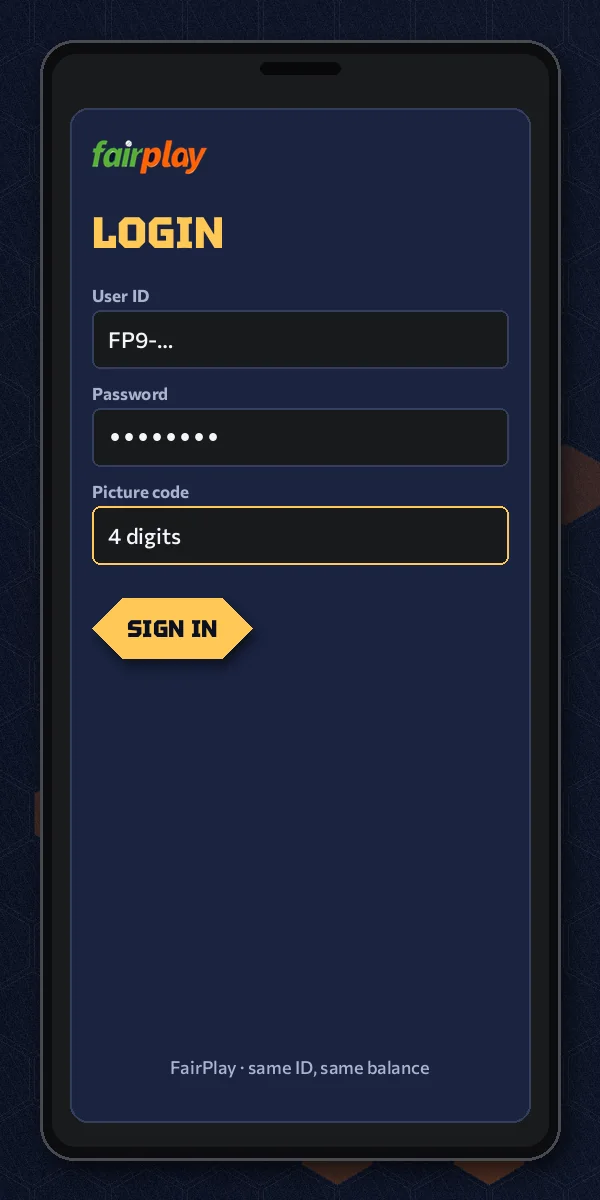
- Open the current FairPlay address in your browser or the app, and wait for the sign-in card to finish loading, picture included.
- Tap the User ID box, clear anything the browser filled in, and type the ID exactly as it was given to you. Check the first letter.
- Move to the password box. Caps Lock off, keyboard language the same one you used when you set the password.
- Zoom on the picture if you are on a phone. Read the four digits left to right, then read them again.
- Type the code and press sign in once. One press. A double tap can send the form twice.
- If the card locks, leave it alone for 90 seconds, then repeat steps 4 and 5 only; the ID and password you typed are not the problem.
That last step is the one people skip. After a lock, the instinct is to retype everything from the top, as if the whole card was wrong. It wasnt. The FairPlay card told you which part failed by locking, and the lock is tied to the picture code, so fix the code and leave the rest.
Some players like to type the picture code first and the ID second. Do not. The order on the card is User ID, password, code, and filling it in that same order means the code is the last thing you look at before pressing the button. Fresh in your eyes. Less chance of a swap.
When to stop retrying the FairPlay card
Two locks in a row is a signal. By the third try you have zoomed, you have read slowly, and the code is almost certainly right, so whatever is still failing is probably the ID or the password hiding behind the code error. Stop there. Clear the User ID box and type it fresh, check Caps Lock, and try once more. If it still refuses, the reset route or the WhatsApp desk will get you in faster than a fourth lock will.
We have watched people go six or seven rounds on a FairPlay card before asking anyone. Every round costs a minute and a half. A message costs a lot less then that.
A small aside on bookmarks: save the address you actually signed in from, not the one a friend forwarded months ago. (Old forwards are the most common reason a FairPlay log in page shows nothing.)
FairPlay Login in Four Clear Numbers
Those four figures are really the whole FairPlay login. Everything else on this page is about not wasting the 90 seconds.
About that single press. On a slow connection the button can look like it did nothing for a second or two, and the urge is to tap it again. Resist it. A second tap can send the same form twice, and if the first one went through with a wrong code you may be staring at the lock before you even realise what happened. Give the card a few seconds to answer. If you see the the lobby, you are done; if you see the lock, you know exactly which field to fix.
Why a lock at all, rather than a simple error message? Hard to say for certain what the operators had in mind, but the effect is obvious: a script guessing codes would get one try every ninety seconds, which makes guessing pointless. For a person it is a short pause. For an automated attack it is a wall. That trade is why the lock exists on the FairPlay card and why it is not something to fight.
How the FairPlay lock adds up over a few bad tries
Assuming every wrong code earns the same 90-second pause, the waiting stacks up quicker than it feels in the moment:
| Wrong codes in a row | Time spent locked |
|---|---|
| 1 | 1 min 30 s |
| 2 | 3 min |
| 3 | 4 min 30 s |
| 4 | 6 min |
Four careless codes and the first over of a T20 has gone by. That is roughly the most useful thing a FairPlay player can know about the lock: it is short once and long if you keep feeding it. So if a match matters to you, open the card ten minutes early, not two. A clean sign-in takes well under a minute, and the spare time covers one lock without stress.
It also means a lock is not a sign that anything is wrong with your account. Your FairPlay balance, your open bets and your ID are untouched by it. The card is just slowing the next attempt down. After you are in, money questions such as payouts and account history sit on the My FairPlay account page, not on the sign-in card.
People also search
Clear FairPlay Com Login Notes for the Picture-Code Card
What fairplay login means on this card
FairPlay login here is one action on one card: User ID, password, then the four digits from the image. Search engines see it spelled as fairplay log in, fair play login and fairplay login id password, and all of them land on the same three fields typed in the same order.
Where fairplay com login fits with today's address
The com in that search is mostly habit carried over from older addresses. On this card it changes nothing: same three fields, same lock length, same wallet behind them. When one FairPlay address stops answering, the next one that loads accepts your existing details with no re-registration at all.
Sorting a fairplay login problem in the right order
Most fairplay login problem reports trace back to one of four causes, and each has its own fix:
- Wrong picture code on the card: wait out the 90-second lock, zoom, retype.
- Password refused: reset it on the password page instead of guessing.
- User ID refused: clear browser autofill and check the first letter.
- Card does not load: change to a working FairPlay address.
Keep that order and a FairPlay sign-in rarely takes longer than the lock itself.
FairPlay Login Questions, Answered With Verified Card Detail
How do I complete FairPlay login?
Fill the card from the top down and press sign in once. User ID goes in the first box, the password in the second, and the four digits from the image in the third. Zoom on the image first if you are on a phone, since one misread digit costs a 90-second wait.
Is FairPlay login safe to use?
Yes, as long as you type into the official FairPlay card and nowhere else. The card needs only your User ID, password and a four-digit picture code, and every wrong code triggers a 90-second freeze, so a bot guessing digits gets almost nowhere. Never share the password, even with friends who offer to sign in for you.
What happens if I enter the wrong picture code on FairPlay?
The FairPlay card locks for 90 seconds. Your account, balance and bets are not affected; it is only a pause on the next attempt. When the lock ends, zoom in on the image, read the four digits carefully and type them again. Your User ID and password usually do not need retyping.
How long does the FairPlay login lock last?
Ninety seconds after a wrong picture code. Tapping the button during the lock will not end it any sooner, so put the phone down and count it out. Once it lifts, retype only the code. If the lock keeps coming back, the digits are being misread, so zoom in before typing.
Do I need a minimum deposit before FairPlay login works?
No. FairPlay login only checks your User ID, password and the picture code, so you can sign in with an empty wallet. Deposits happen after you are inside the lobby, and the first-deposit amount is explained on the FairPlay ID page rather than on the sign-in card.
Which address should I use for FairPlay com login?
Use whichever FairPlay address opens today. Addresses change when Indian providers block them, but your User ID, password and balance stay the same on every working one. The FairPlay com address page keeps a dated list of what loads, so check it before trying old bookmarks.
Why does FairPlay login keep saying my details are wrong?
Usually one field is off, not all three. Check the User ID for an auto-capital or a browser-filled old ID, check the password with Caps Lock off, and zoom on the picture code. If the password still fails, reset it on the FairPlay login password page instead of guessing.